Orbit v1.4.2 — Multi-Programme ADM and a Major Step Toward Full Spec Compliance
The biggest spec-compliance release Orbit has shipped. Programme switching that mutes the right channels. A dub-track language picker. Multi-bed-group support. An upgraded sidebar for EBU ADMs. Plus every fix from the v1.4.1 Beta — large masters, deep-zoom waveforms, and a single-scanner peak pipeline.
Orbit 1.4.2 is here.
If your master ships with more than one mix in it — a Full Mix, an M&E pass, a stems version, language variants, an accessibility cut — Orbit now switches between them properly. Pick the version you want and you hear that version. A new picker lets you swap dialogue languages without reopening the file, the sidebar gives you a much clearer view of what’s actually in the master, and the audio engine doing the work has been substantially rebuilt under the hood.
Both editions, same update. Every sidebar and engine change below ships to Orbit and Orbit Pro at the same time — on Stable and Beta channels simultaneously, with every fix from the v1.4.1 Beta cycle folded in.
Not tried Orbit? Start a free 14-day trial or purchase a licence — no credit card needed for the trial.
Multi-Programme Switching
The headline feature. If your master declares more than one <audioProgramme> — Full Mix, M&E, an Accessibility variant, a stem mix — Orbit’s programme picker now respects which channels belong to which programme. Switch to M&E and the dialogue tracks mute. Switch back to Full Mix and they come in. The programme-membership filter is owned by the engine, so the result is bit-identical to what an EBU ADM Renderer or any other spec-compliant ADM player would do with the same file.
Dub-Track Language Picker
For files that ship multiple dialogue language tracks as complementary audioObjects (BS.2076-3 §5.6.3), the sidebar now exposes a picker so you can choose which language to route at playback time. Picker entries use the file’s host-locale-matched audioObjectLabel where present — so EN, DE, JA appear with their localised display names.
Multiple Bed Groups
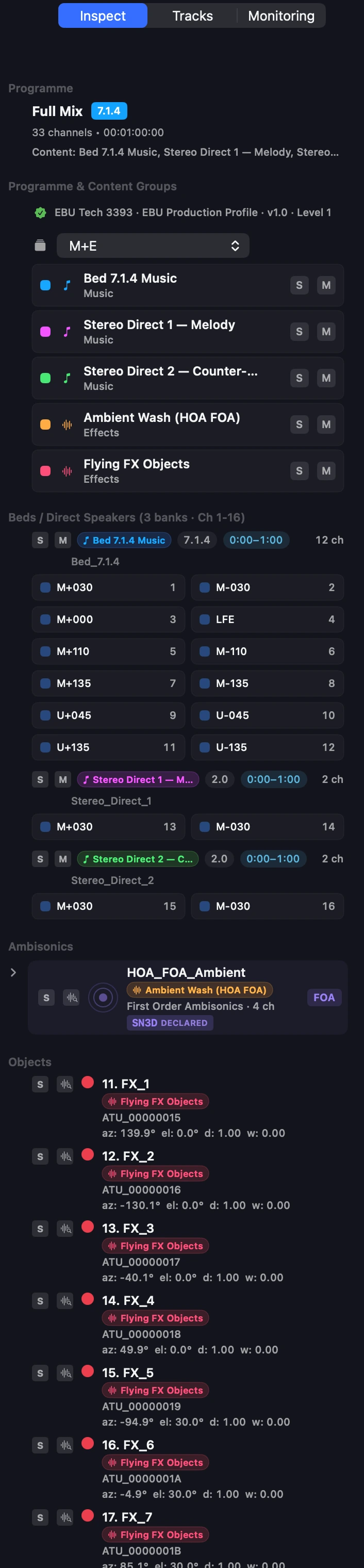
EBU workflows often package more than one bed group into a single master — a 5.1 music bed alongside a 7.1.4 effects bed, a backup mix sitting next to the primary, or a dialogue stem broken out for accessibility delivery.
Orbit used to flatten those into a single bed bank. v1.4.2 treats each declared bed group as a first-class entity:
- Every bed group gets its own sidebar row, with the bed format (Stereo, 5.1, 7.1.4, etc.), its
audioObjectName, its declared gain, and itsstarttime. - Groups list in chronological start-time order — they appear in the sidebar the same way they sit on the timeline.
- Per-bed solo / mute (more on this below) operates at the group level, so you can isolate music bed, effects bed, or primary mix without touching channels individually.
- Speaker labels resolve per group — Orbit honours BS.2094 common-definition labels (
M+030,M-030,U+045,LFE, etc.) on each bed, so the bed-format detector reports the right shape even when groups overlap ontrackIndex.
Single-bed files behave exactly as before. The new structure only shows up when there’s something to show.
BS.2076-3 Sidebar
The ADM sidebar has been substantially rebuilt around the BS.2076-3 presentation layer. You'll now see:
- Programmes — every
<audioProgramme>in the file, withaudioProgrammeLanguageand locale-aware labels. - Content groups per programme — Dialogue, Music, Effects, Mixed, etc., each carrying its dialogue classification (BS.2076-3 §5.7.3).
- Complementary object groups — alternative dialogue, commentary, and accessibility variants, rendered with their accessibility intent visible.
- Polar coordinates for polar-authored objects. The renderer always rounds to Cartesian internally, but the sidebar shows you what the file actually declared — useful when you're tracing why a position rendered the way it did.
- Auto-generated colours for every programme, content group, bed, and object so you can find what you're looking for at a glance. A splash of colour beats the grey-box DAWs of old.
Per-Bed Solo / Mute
Each bed bank now has S / M buttons in its header — so you can solo or mute a whole bed group as easily as you can a single channel. Handy when QC’ing a file with multiple bed-format audioObjects (e.g. a stereo bed plus a 5.1.4 bed nested together).
Heads-up: S / M only affects channels the active programme is currently routing. If you solo a group the active programme isn’t including — Audio Description in a programme that doesn’t carry it, for example — nothing audible will change. A clearer UI signal for this case is on the way in 1.4.3.
Per-Content-Group Solo / Mute
Solo / mute now fans out via the engine to all tracks in a content group — so soloing Music mutes everything that isn’t music, regardless of how that music is split across beds, objects, and HOA.
EBU Production Profile
If the file declares an EBU <profile> (e.g. EBU R128 ADM mode, Tech 3392), Orbit’s sidebar now shows whether your file’s structure meets the declared profile’s requirements at a glance. Saves you a trip into the AXML inspector for routine spec checks.
Smaller Polish
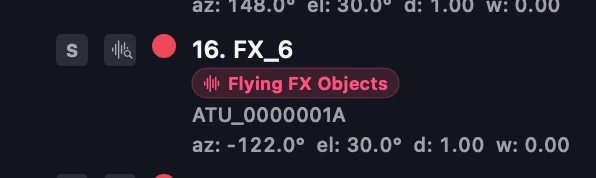
Polar-authored objects display their original spherical coordinates in the sidebar — azimuth, elevation, distance and width — even though the renderer interpolates in Cartesian. What the file declared, surfaced clearly.
- Object time-windows clip the All-Tracks waveform display — empty space outside an object’s
start/durationno longer draws as if there’s silent audio there. - AXML inspector deep-compliance pass — a longer-tail QC sweep through the AXML inspector for production-profile fields, ahead of v1.5.
A Quick Taste of OrbitCore
Orbit is now built on the same OrbitCore SDK we’ll be shipping to developers. From a fresh swift package add to a working spatial-audio player is four lines:
let engine = try OrbitCoreKit.OrbitEngine()
try engine.content.loadADM(url: admURL)
try engine.startAudioDevice()
engine.transport.play()
That same shape — engine.something.doThing(...) — covers the whole engine. Switching programmes (engine.adm.setActiveProgramme(1)), IAMF encode/decode (engine.iamf.export(config)), HRTF binaural (engine.binaural.hrtf.profile = .high), loudness, head-tracking, mixing, calibration — all dot-notation, all typed Swift, no C structs and no unsafe pointers.
Every feature you see in Orbit talks to that surface. Public SDK coming soon with commercial licences available.
Carrying Forward from v1.4.1 Beta
If you stayed on Stable through the v1.4.1 beta cycle, the three fixes from that beta are folded into this release:
- Large Atmos masters (RF64 / BW64 / >4 GB) import cleanly. The background indexer used to reject RF64 containers, 32-bit IEEE float samples, and WaveFormatExtensible headers. Sidebar peaks appeared only after closing and reopening the session. Now they populate on the first open.
- Waveform gaps past 8× zoom are gone. The peak pyramid was leaving most of its high-resolution buckets at zero on upsampling, producing thin vertical bars with regular blank gaps at deep zoom. Fixed. Existing sessions need a cache rebuild to pick this up — see follow-ups below.
- Single-scanner architecture. Opening a session no longer triggers two competing waveform scans for the same file. The v1.4.0 behaviour where sidebar peaks could flicker or stay blank until reopen is resolved.
Also under the hood: the audio engine (OrbitCore 1.5.0+) is now JUCE-free — it talks to macOS’s CoreAudio HAL directly. Smaller app size, quicker launch, no behaviour change.
Known Follow-Ups
- Cache-rebuild for old sessions — sessions opened in v1.4.0 will keep their existing waveform pyramids until rebuilt. Use Debug → Rebuild Waveform + Peak Caches if you see deep-zoom gaps (same advice as v1.4.1).
- Matrix
typeDefinition— flagged in our BS.2076-3 compliance audit as unimplemented. Not on the critical path yet; logged for v1.5 / v1.6.
Try Orbit free for 14 days — or try Orbit Pro free on the Early Access Beta until 26 June 2026.
Got feedback? Drop it in the feedback portal — we read every one.
— The Orbit Spatial Team