Orbit Pro

1.5 is out now — the most capable Orbit yet.

IAMF / Eclipsa export · timeline · built-in video editor · macOS 14+

One-time · Apple Silicon · macOS 14+ · Pro Education £149

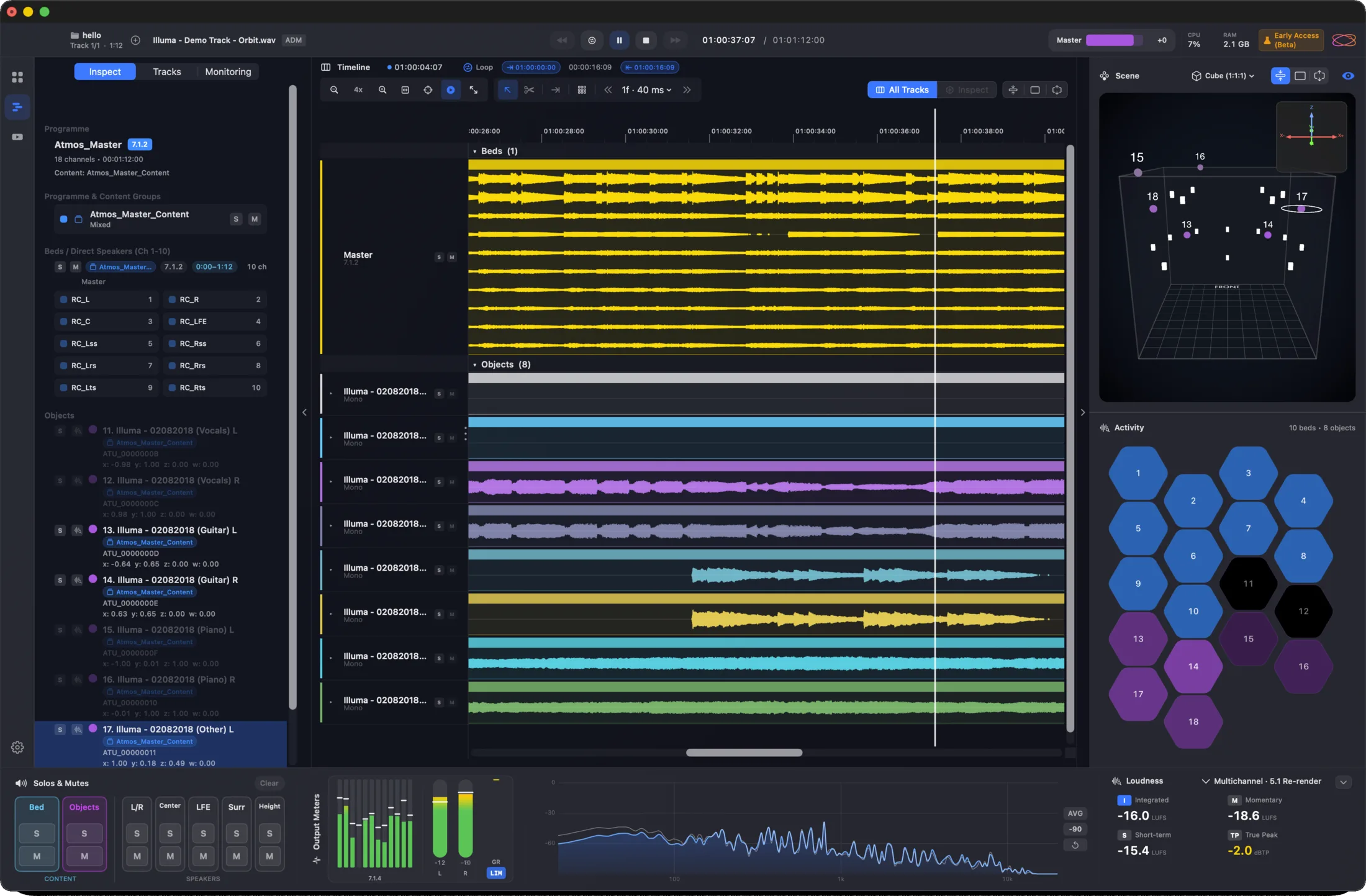
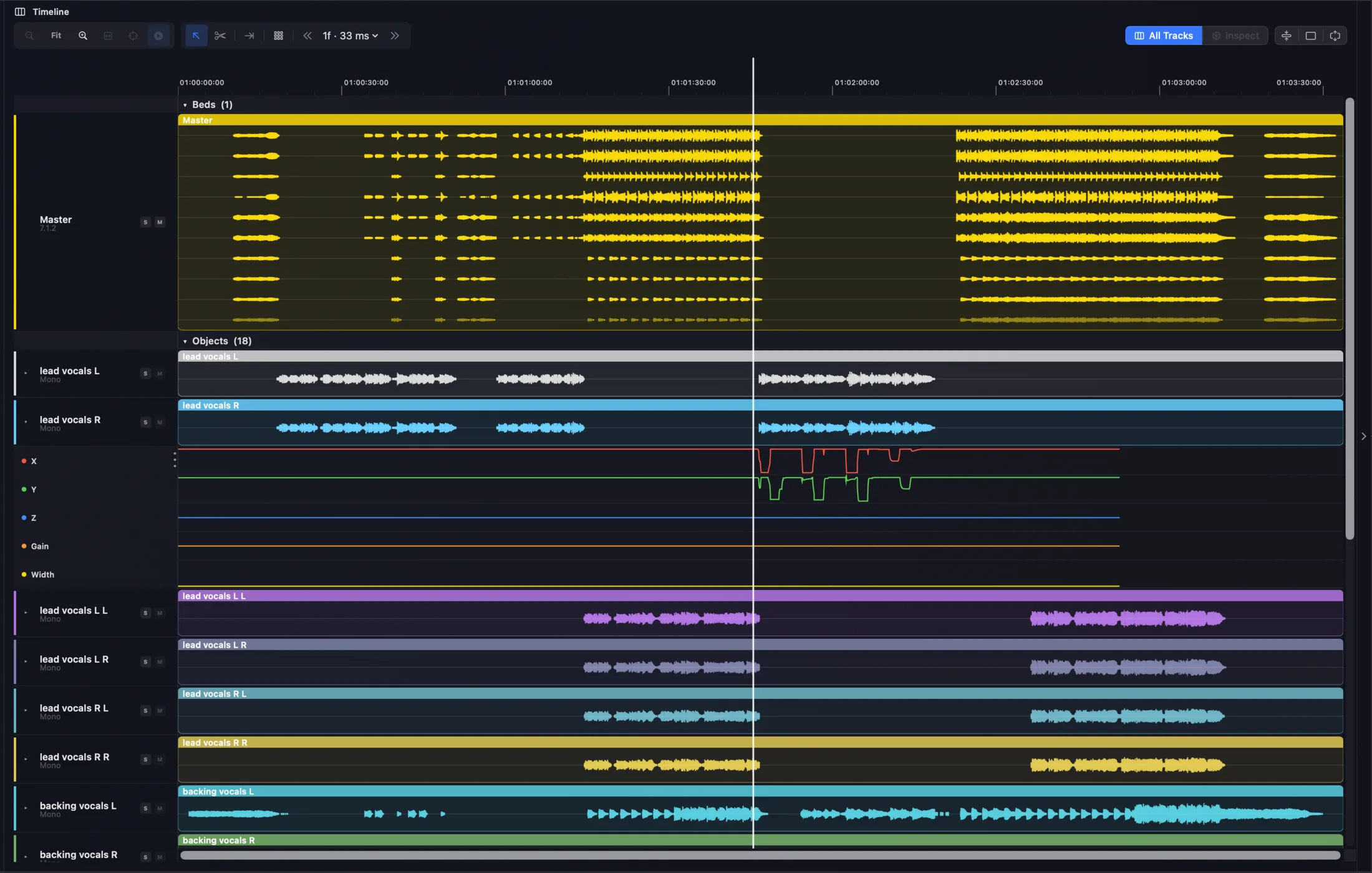
Orbit Pro 1.5 timeline — full multitrack ADM/IAMF with per-track solo, markers, 3D scene and activity

Watch the film

Inside Pro 1.5
Timeline

Every track, down to the object

A full timeline view of your ADM or IAMF master — beds, objects and stems laid out as colour-coded waveforms, with per-track soloing, looping and markers. Read automation, spot a silent object, scrub anywhere. Properly detailed, and fast.

Beds · objects · stemsPer-track soloLoopingMarkers
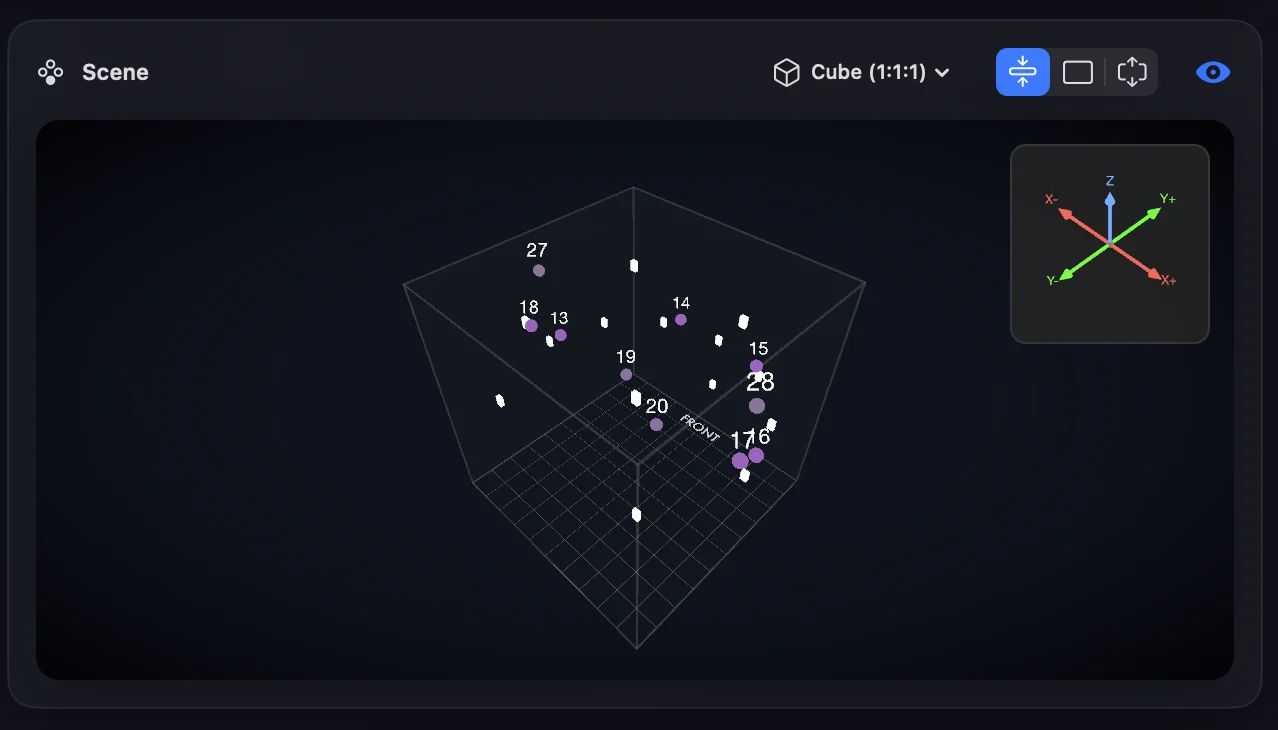
Orbit Pro 1.5 timeline tracks — colour-coded beds, objects and stems with per-track waveforms and a playhead Timeline right sidebar — a 3D scene of object positions above the activity grid

Tracks on the left, the 3D scene and activity docked to the right — live as the file plays.

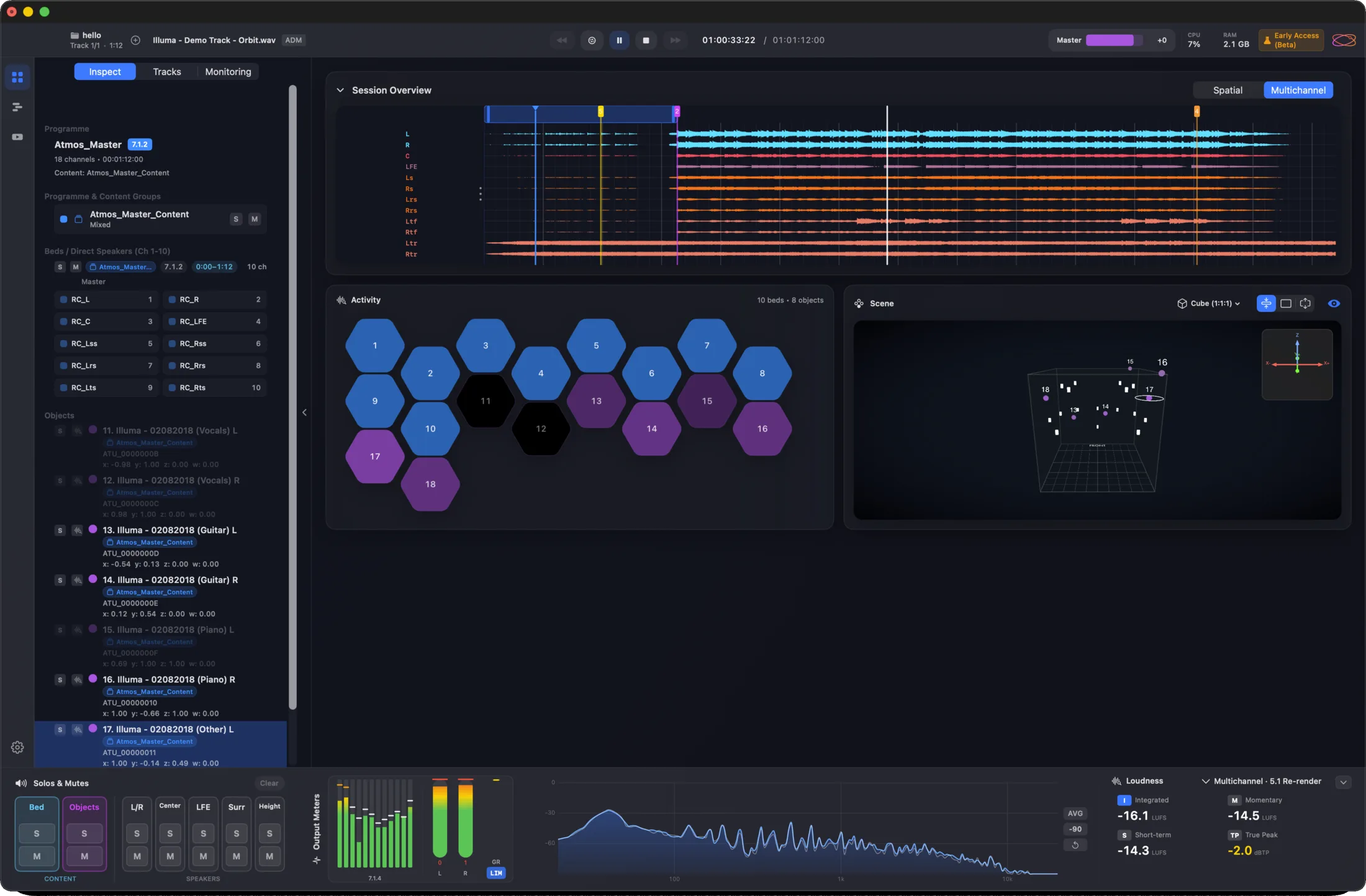
Overview

Your whole session, at a glance

The original Orbit view, refined — session waveforms across the top, the activity grid and 3D scene side by side, and full metering below. Everything you need to read a master on one screen.

Activity grid3D sceneSession waveformLoudness by Cota
Orbit Pro 1.5 Overview — session waveforms, activity grid, 3D scene and metering
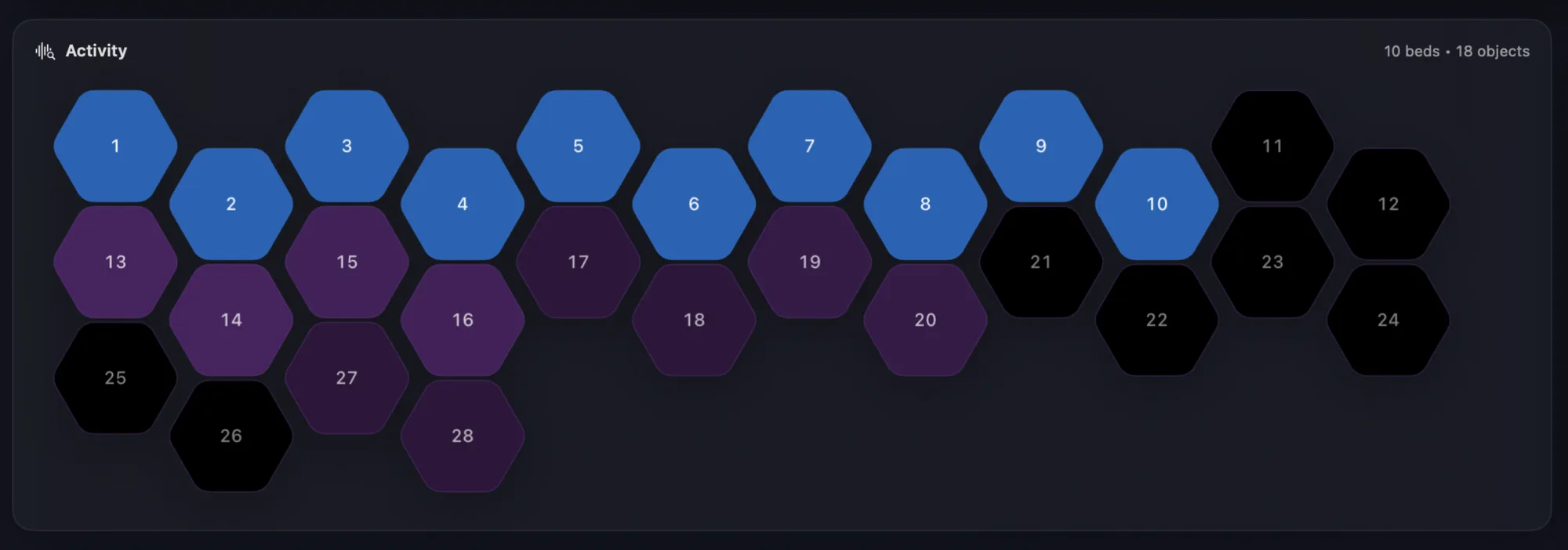
Activity grid — a hex per bed and object, lit by how active each one is
Activity — one hex per bed and object, lit by how much each is actually doing.
Real-time analyser — a fluid, detailed frequency spectrum
A new real-time analyser — fluid, clear and detailed, right in the meter bridge.
Object Activity

Every object, moving in real time

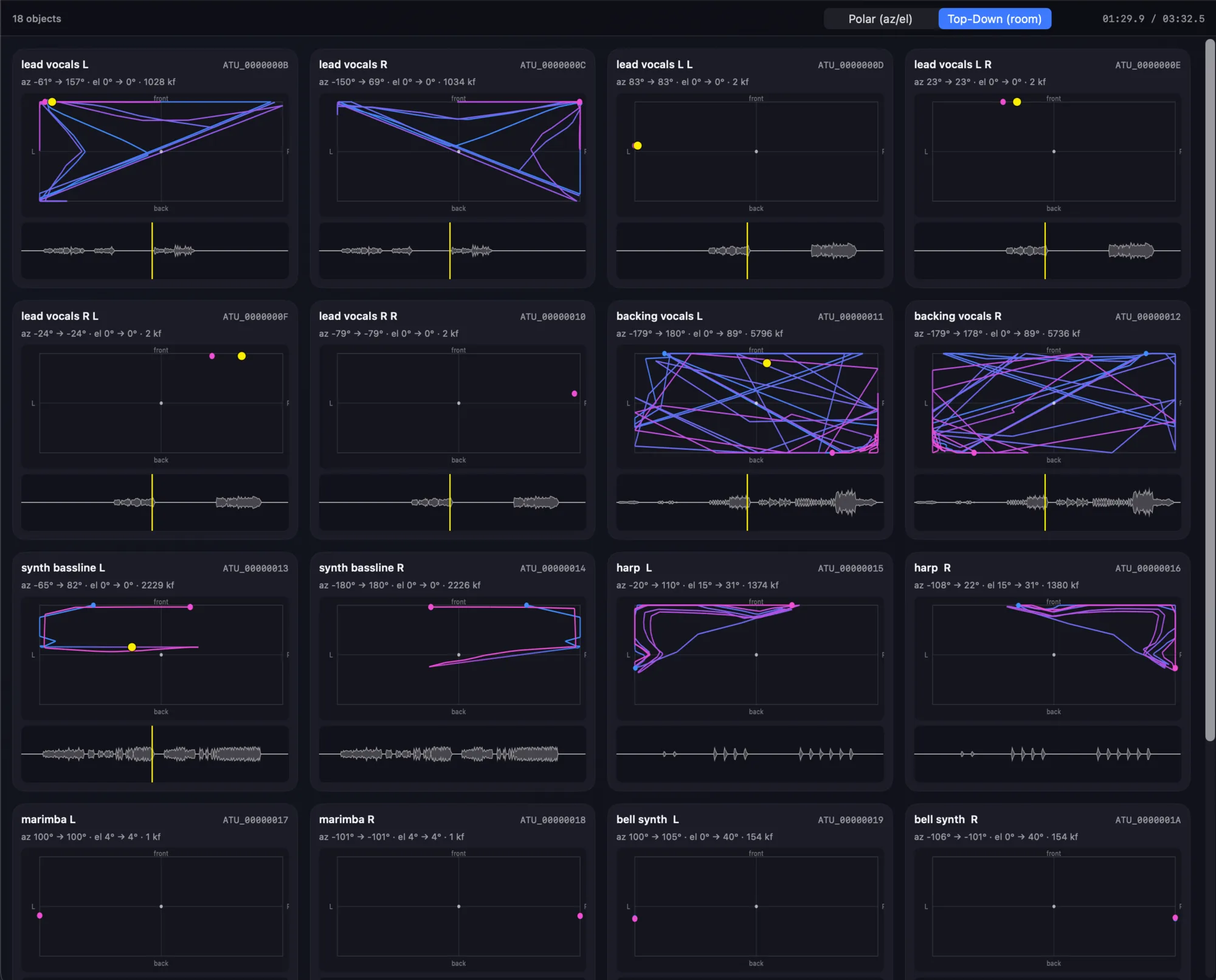
A dedicated window — Pro only — that lays out every object in your master and traces its path as it plays. See trajectories top-down or in polar az/el, alongside each object’s waveform and live position. The fastest way to understand what a complex mix is actually doing.

Pro onlyEvery objectReal-time pathsTop-down · polar
Orbit Pro Object Activity window — every object with its movement trajectory, waveform and position
Speaker Layout

Solo, mute & group — right on the speakers

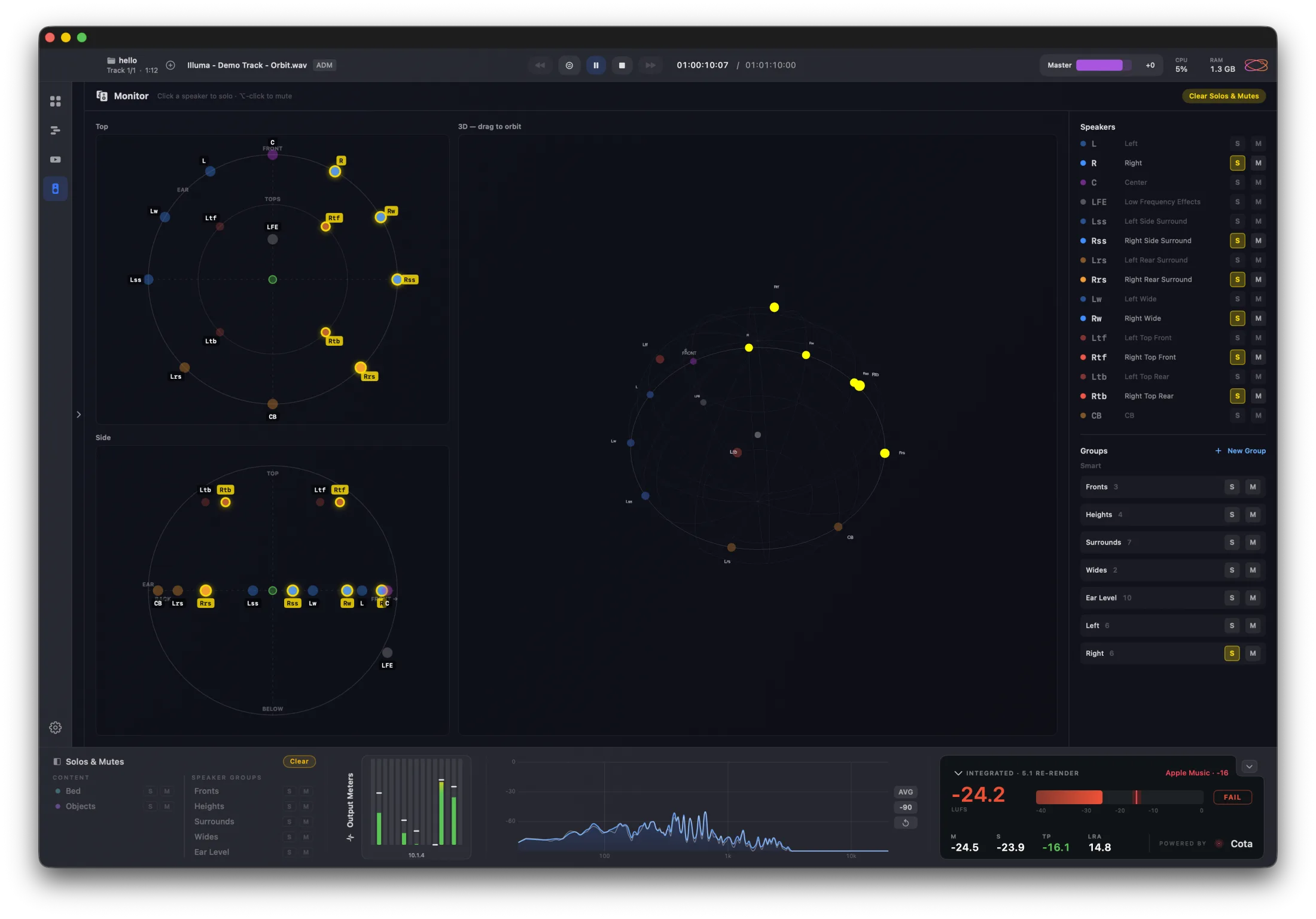
New in 1.5.2 — a speaker layout view, Pro only, across the multichannel output system. Click any speaker in the top-down, side or 3D view to solo it, or build custom groups of solos and mutes that follow you across every view. Simple, and powerful for testing. Works with any layout up to 64 channels via OSLS.

Pro onlyTop-down · side · 3DSolo · mute · groupsAny OSLS layout
Orbit Pro’s speaker layout view — top-down, side and 3D layouts with per-speaker solo/mute and custom groups
Video

A real NLE, built in

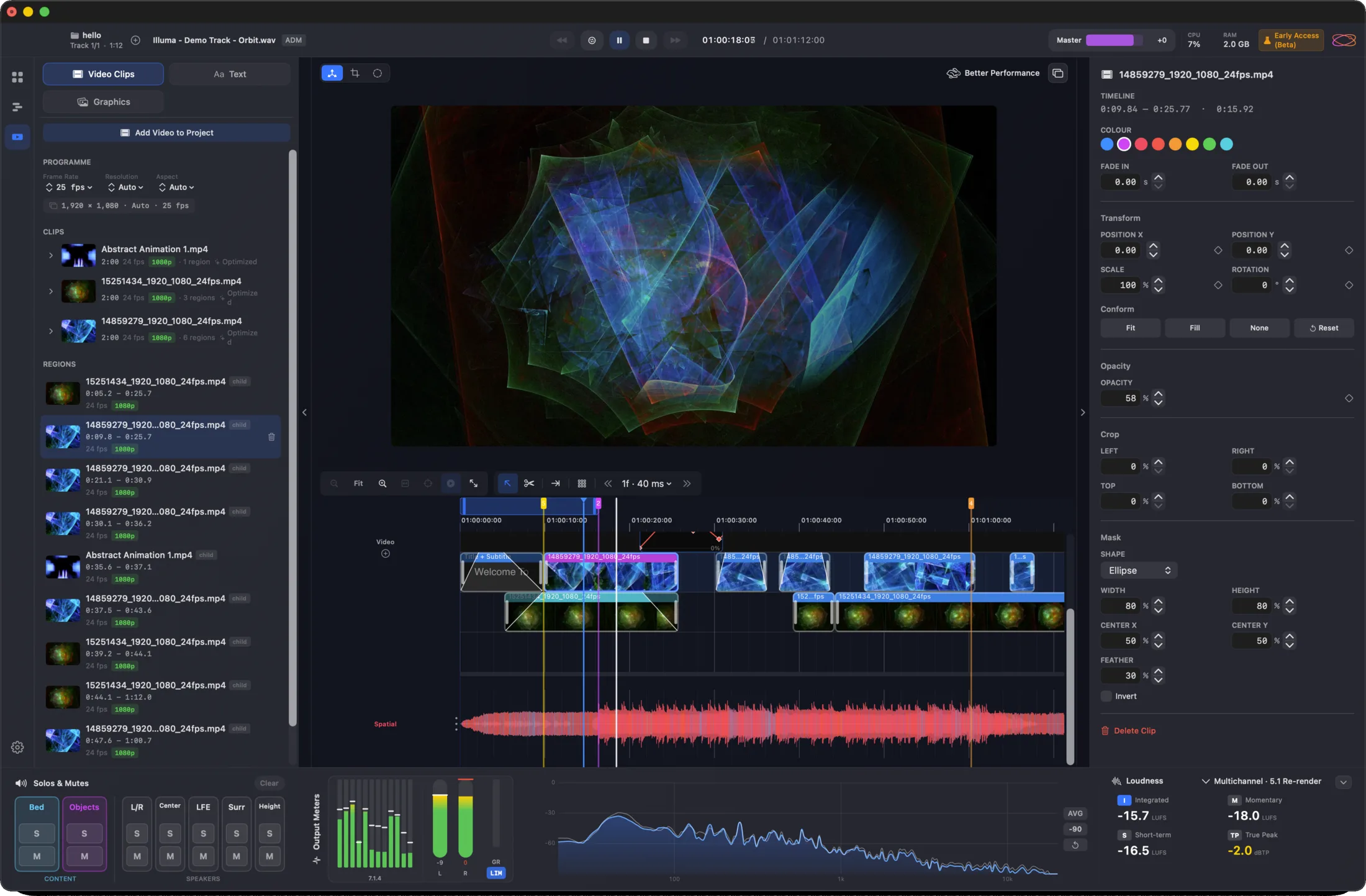
A small but genuinely powerful video editor — enough to cut a quick music video or podcast bound for IAMF / Eclipsa. Don’t need to edit? Just drag your video in. Fast scrubbing, proxy generation and up to 4K, plus text and graphic tools — with more to come.

Up to 4KProxy creationText & graphicsQuick scrubbing
Orbit Pro 1.5 built-in video editor — preview, clip timeline and inspector
IAMF export

Quite possibly the world’s most advanced IAMF export

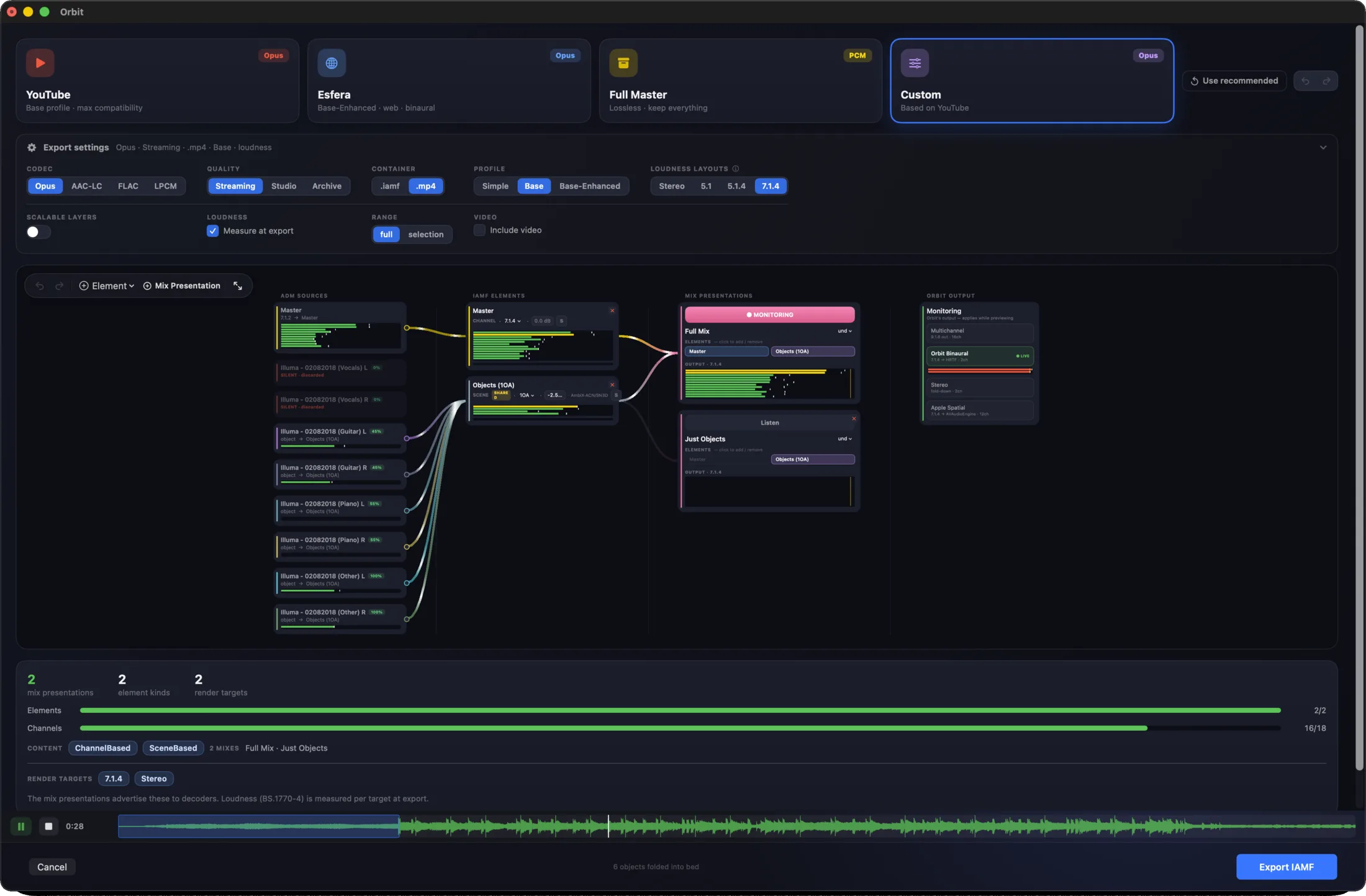
A powerful, flexible audio-routing graph for taking an ADM, EBU or Atmos master to IAMF / Eclipsa. Go fast with auto-route presets — YouTube, and our upcoming Esfera platform — or take full control. Hear exactly how the file will sound as objects fold into First-Order Ambisonics elements, and craft Mix Presentations for alternate mixes: no-vocals, different languages. Nothing else works quite like it.

Auto-route presetsObjects → FOAMix PresentationsADM / EBU / Atmos → IAMF
Orbit Pro 1.5 IAMF export routing graph with auto-route presets and mix presentations
Close-up of the IAMF routing graph — ADM sources and objects feeding a Mix Presentation, monitored live across Multichannel, Orbit Binaural, Stereo and Apple Spatial outputs
Objects and beds route into Mix Presentations — and on to every output, monitored live as you build.
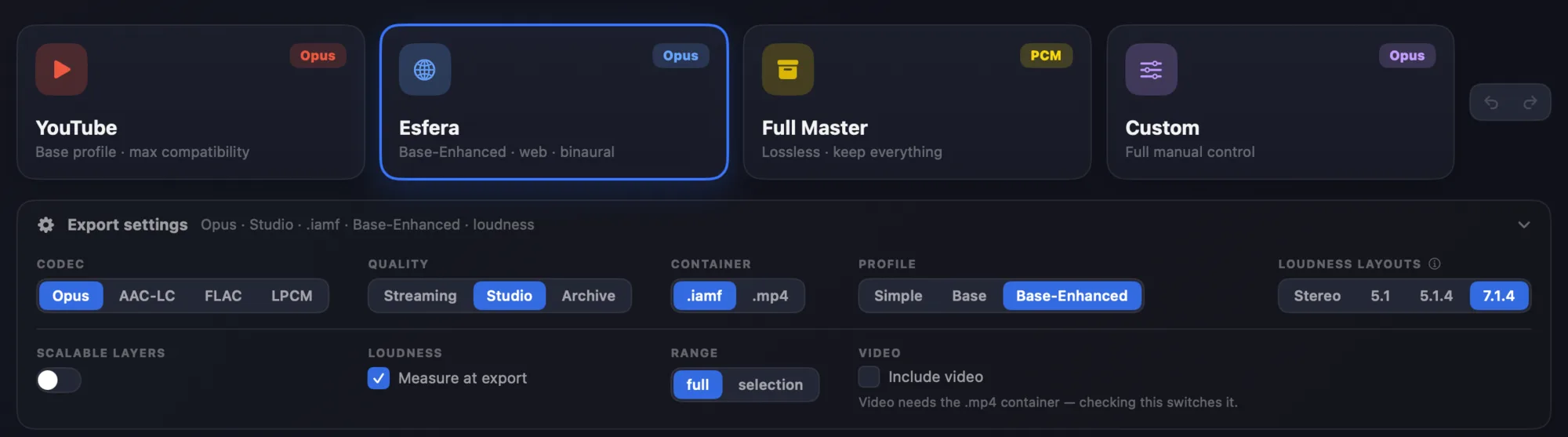
Close-up of IAMF export presets — YouTube, Esfera, Full Master, Custom — with codec, quality, profile and loudness-layout settings
Start from a preset — YouTube, Esfera, Full Master — or take full manual control of codec, profile and layouts.

+ object inspection, head tracking, themes and more — see every Pro feature →

Files & formats

Reads your masters exactly as they are

Open the files you already work with — and take them where they need to go. Both Orbit and Orbit Pro read ADM BWF and IAMF; Orbit Pro adds ADM → IAMF export.

ADM BWF

EBU & Dolby Atmos masters

Both EBU and Atmos ADM BWF masters are fully supported. Orbit uses its own rendering engine — no Dolby renderer — to read ADMs as flexibly and accurately as possible. It’s also what lets us visualise a master in the detail you see throughout Orbit.

EBU ADM Dolby Atmos ADM Own rendering engine Deep visualisation
IAMF · 1.0 / 1.1 / 2.0

Read in both — export in Pro

IAMF files open in both Orbit and Orbit Pro. Orbit Pro also exports ADM → IAMF, with or without video. From there, take your file to YouTube (on supported devices), our upcoming Esfera streaming platform, or verify it in Google’s IAMF Binaural Web Demo.

IAMF 1.0 / 1.1 / 2.0 ADM → IAMF · Pro YouTube Esfera
Speaker formats

From Quad to any layout you can build

Monitor and render to the speaker layout your room and delivery need — the presets below, or any custom rig up to 64 channels, powered by OSLS, our open-source layout system. Binaural and stereo fold-downs stay consistent across every layout.

Quad 5.1 5.1.4 7.1.4 9.1.4 9.1.6 5.1.2 7.1.2 OSLS · custom →

Dashed layouts (5.1.2, 7.1.2) are coming soon. Custom layouts up to 64 channels via OSLS.

Which is right for you?

Four ways in. Pick the one that sounds like you.

New to Orbit

Get the full Pro toolset.

Buy Pro — £229

Just want to try it

Free for 14 days.

Start free trial

Already own Standard

Pay only the difference — applied at checkout.

Upgrade to Pro

Student or teacher

Verified education pricing.

Pro Education — £149
Pro or Standard?

Same engine. Pro adds the tools.

Every Orbit edition shares the same audio engine, the same 7.1.4 monitoring, the same ADM fidelity. Pro adds finishing, export and review on top.

Orbit Standard

£99

One-time

The full ADM QC suite — the tool hundreds of studios use daily.

  • ADM BWF playback — 7.1.4 / binaural / stereo
  • Loudness metering — powered by Cota (BS.1770-5)
  • Custom speaker layouts up to 64ch — OSLS
  • ADM audit + object inspection
  • Session save & restore
  • Free updates within major version
Get Orbit Standard

Orbit Pro

Most capable
£229 one-time

14-day free trial · no subscription

  • Everything in Standard
  • IAMF / Eclipsa export graph
  • Built-in video editor (NLE) up to 4K
  • Full timeline — per-track solo, looping, markers
  • 3D scene + activity views
  • Speaker layout view — solo, mute & custom groups
  • Per-object markers + PDF reports
  • All-tracks view & auto-play playlist
Buy Pro — £229

One-time · free updates within 1.x

Pro Education — £149

Verified students and teachers get the full Pro toolset at a reduced price. Same features, same updates.

Buy Pro Education — £149
Free trial

Try Orbit Pro free for 14 days.

Sign in, start your trial and get the full Pro feature set for 14 days — no card, no commitment. Buy whenever you're ready.

Requires an Orbit account · one per account