

Test material · free to download

IAMF and ADM test files.

Reference files for checking a player, a decoder or a delivery chain before your own masters go through it. Free to download, free to pass on.

IAMFEclipsa Audio™.iamf.mp41080p · 4K · 8K360°ADM BWF

IAMF · Eclipsa Audio™

IAMF test files.

Demos come in more than one profile and codec, so you can check exactly what your chain supports: Base, Base-Enhanced and Advanced 2, in Opus, FLAC and LPCM. There’s also a speaker calibration test, in Base and Advanced 2.

Audio only

.iamf and .mp4 · no picture
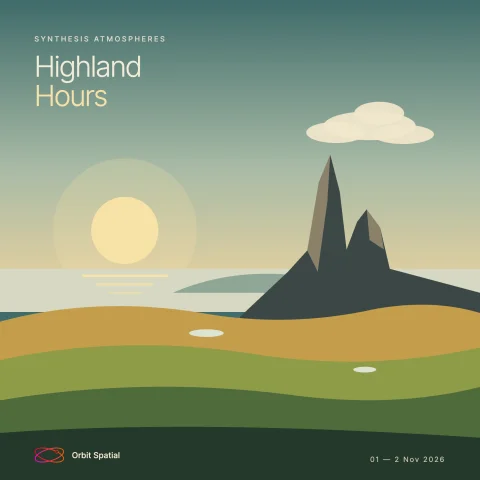
Highland Hours cover art: a sun setting over the sea behind a rocky peak and rolling hills

Highland Hours

Base-Enhanced

By the Orbit Spatial team · 30:00

A 7.1.4 bed and a 3rd-order ambisonic scene, the same mix in lossless LPCM and in Opus, as a standalone .iamf or in an .mp4.

Converted from ADM in Orbit 1.5.11 beta. Free to use in any project, commercial work included.

File.iamf.mp4
Base-Enhanced · LPCMLossless · uncompressed · a very large file .iamf7.3 GB
Base-Enhanced · OpusLossy · the smallest files .iamf622 MB .mp4622 MB
Sound
48 kHz · 7.1.4 and 3rd-order ambisonics, 28 channels · no picture
Codecs
LPCM (.iamf) · Opus (.iamf and .mp4)
Timestep

Base, Base-Enhanced and Advanced 2

Drum & Bass by 7ude · 2:36

One mix, carried three ways: the whole mix as a 3rd-order ambisonic scene (Base), a 7.1.4 bed with the objects in a 3rd-order scene (Base-Enhanced), and a 7.1.4 bed with 16 separate objects (Advanced 2).

Mixed in Logic Pro as ADM, converted to IAMF in Orbit Pro

Uses the Advanced 2 profile, which is final in the IAMF v2.0 specification. Eclipsa Audio™ doesn’t cover it yet (it covers the Simple, Base and Base-Enhanced profiles), so the Advanced 2 files aren’t Eclipsa Audio™ content.

File.iamf
Base · Opus3rd-order ambisonic scene, 16 channels · lossy .iamf29 MB
Base-Enhanced · Opus7.1.4 bed and a 3rd-order scene, 28 channels · lossy .iamf45 MB
Advanced 2 · OpusLossy · the smallest files .iamf37 MB
Advanced 2 · FLACLossless · compressed .iamf146 MB
Advanced 2 · LPCMLossless · uncompressed .iamf630 MB
Sound
48 kHz. Base: 3rd-order ambisonics, 16 channels. Base-Enhanced: 7.1.4 and 3rd-order ambisonics, 28 channels. Advanced 2: 7.1.4 and 16 objects, 28 channels
Codecs
Opus in every profile. Advanced 2 also as FLAC and LPCM
ProfileCodecWhat's in itDownload
BaseEclipsa Audio FLACLossless · compressed Details to come. .iamf — soon

With video

.mp4 · picture in sync
8K Test Demo for IAMF, encoded in Orbit Pro 1.5.10
Preview still only. Download a file below to watch the full programme.

Classical Recording Test Demo for IAMF with Video

Eclipsa Audio
Base profile

7.1.4 audio element · 4:26

Mixed in Logic Pro as ADM, converted to Eclipsa Audio in Orbit Pro 1.5.10

File1080p4K8K
Base · OpusLossy · the smallest files 1080p418 MB 4K1.5 GB 8K5.9 GB
Base · FLACLossless · compressed 1080p629 MB 4K1.7 GB 8K6.1 GB
Picture
1920 × 1080 (1080p) · 3840 × 2160 (4K) · 7680 × 4320 (8K) · 60 fps · HEVC · SDR
Sound
IAMF Base · 7.1.4 · 48 kHz, plus a stereo AAC fallback

Speaker Calibration Stabs

Base and Advanced 2

16 positions · 120 BPM · four passes · 0:35

One stab at a time, at each of 16 positions in turn: 12 around you at ear height, every 30°, and four overhead. The picture names each position as it plays.

Play it here, on your speakers

The player runs in your browser. Pick Speakers in the bar under the picture to send each stab to its own output, or Binaural for headphones.

Speakers only appears when your computer offers a multichannel output. Check your device supports multichannel out and is configured correctly: make it the system’s default output and set its speaker layout (on a Mac, in Audio MIDI Setup), then reload this page.

File4K
Base · FLACEclipsa AudioA 3rd-order ambisonic scene · each stab spreads into the speakers around it 4K44 MB
Advanced 2 · FLAC16 objects · each stab is its own objectUses the Advanced 2 profile, which is final in the IAMF v2.0 specification. Eclipsa Audio™ doesn’t cover it yet (it covers the Simple, Base and Base-Enhanced profiles), so this file isn’t Eclipsa Audio™ content. 4K35 MB
Picture
3840 × 2160 (4K) · 60 fps · HEVC · SDR
Sound
FLAC · 48 kHz. Base: 3rd-order ambisonics, 16 channels. Advanced 2: 16 objects. No stereo fallback

Advanced 2 demo

Advanced 2 · coming soon

Opus and LPCM, at 1080p, 4K and 8K. Programme details to come.

8K files are large. Each one is a complete, playable .mp4 — no separate audio and picture to line up.

Orbit sessions · 360°

360° sessions with IAMF masters.

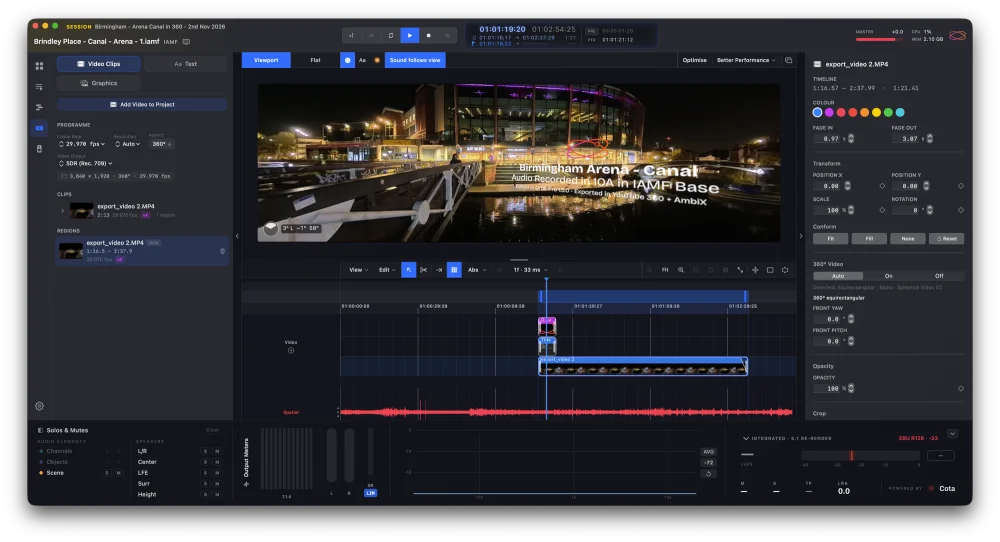
Complete Orbit sessions built around 360° recordings: the 360° picture on the timeline and an IAMF master with first-order ambisonics. Open one to see how a 360° project fits together, then export it for YouTube yourself.

The Arena Canal session in Orbit Pro: a title and graphics over the 360° video in the viewport, with the clips on the timeline and the first-order ambisonic IAMF recording below
The Arena Canal session in Orbit Pro 1.5.10: text, graphics and 360° video working with an IAMF recording in first-order ambisonics.

Needs Orbit Pro 1.5.10 or later. Unzip the download, then open the session in Orbit Pro.

For testing, workshops and education only. These sessions, their picture and their sound can’t be used in commercial content.

ADM BWF

ADM test files are coming.

ADM BWF masters for checking a renderer, a QC chain or a delivery spec. They’ll sit here alongside the IAMF files.

Using these files

Play them, pass them on.

Play them

Every Orbit app opens every IAMF file here — Orbit Lite, Standard and Pro. On your speakers, on headphones, folded to stereo or through Apple Spatial Audio.

Pass them on

Send them to anyone testing a player, a TV or a delivery chain. Link to this page rather than re-hosting, so people always get the current versions.

Questions

IAMF test files, answered

What are IAMF test files for?

Checking that a player, decoder, TV or delivery chain handles IAMF properly — profiles, codecs, mix presentations and picture sync — before your own masters go through it.

Are these Eclipsa Audio™ files?

Eclipsa Audio™ is the name Google and Samsung give IAMF audio. Which profiles a given Eclipsa Audio™ device plays is up to that device — finding out is what these files are for.

Why Opus and FLAC or LPCM?

Opus is lossy and keeps files small, the way streaming services deliver them. FLAC and LPCM are lossless, for checking a chain with no codec in the way.

How do I play an IAMF file on a Mac?

Open it in any Orbit app — Orbit Lite, Standard or Pro. Each plays .iamf files and .mp4 files carrying IAMF, with the picture in sync. Playing IAMF on a Mac →

Hear them properly.

Orbit Lite, Standard and Pro all play every IAMF file on this page — through your rig, on headphones or through Apple Spatial Audio.